> ## Documentation Index
> Fetch the complete documentation index at: https://docs.powerdrill.ai/llms.txt
> Use this file to discover all available pages before exploring further.
# Try Out Powerdrill in Minutes
> A quickest way to bring your data into intelligence
export const community_0 = undefined
## Sign in to Powerdrill
To start your Powerdrill journey, first you need to sign up to Powerdrill.
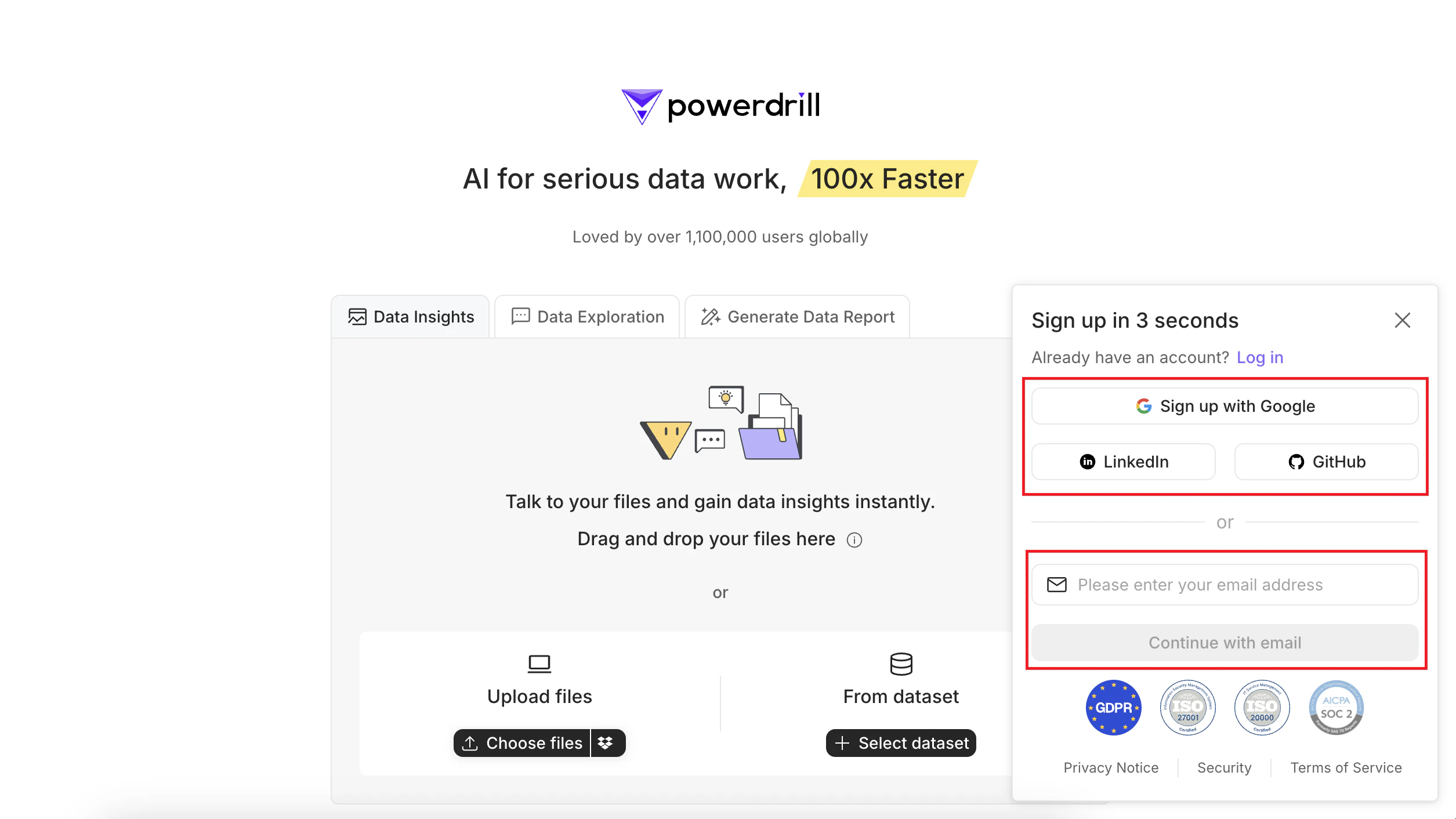
1. Visit [Powerdrill](https://powerdrill.ai/).
2. Sign up with your email. Then Powerdrill will send you a verification code via email.
Alternatively, you can sign up with your Google, GitHub, or LinkedIn account.
 ## Start a chat
After logging in, you will be taken to the homepage. From here, you can choose the appropriate option based on your needs:
* **Data Insights**: If you want to uncover insights from your [CSV](https://powerdrill.ai/features/csv-ai-assistant), [TSV](https://powerdrill.ai/features/tsv-ai-assistant), and [Excel](https://powerdrill.ai/features/excel-ai-assistant) files, click this tab and follow the instructions to upload your files.
* **Generate Data Report**: For a quick report from your CSV, TSV, or Excel files, click here. For more details about this feature, see [AI Report Generator](/features/ai-data-reports).
* **Data Exploration**:
* To interact with other file types such as [Word](https://powerdrill.ai/features/ai-word-assistant), [PDF](https://powerdrill.ai/features/chatpdf), or URLs, use this option.
* To explore multimedia understanding capabilities, also choose this option.
## Start a chat
After logging in, you will be taken to the homepage. From here, you can choose the appropriate option based on your needs:
* **Data Insights**: If you want to uncover insights from your [CSV](https://powerdrill.ai/features/csv-ai-assistant), [TSV](https://powerdrill.ai/features/tsv-ai-assistant), and [Excel](https://powerdrill.ai/features/excel-ai-assistant) files, click this tab and follow the instructions to upload your files.
* **Generate Data Report**: For a quick report from your CSV, TSV, or Excel files, click here. For more details about this feature, see [AI Report Generator](/features/ai-data-reports).
* **Data Exploration**:
* To interact with other file types such as [Word](https://powerdrill.ai/features/ai-word-assistant), [PDF](https://powerdrill.ai/features/chatpdf), or URLs, use this option.
* To explore multimedia understanding capabilities, also choose this option.
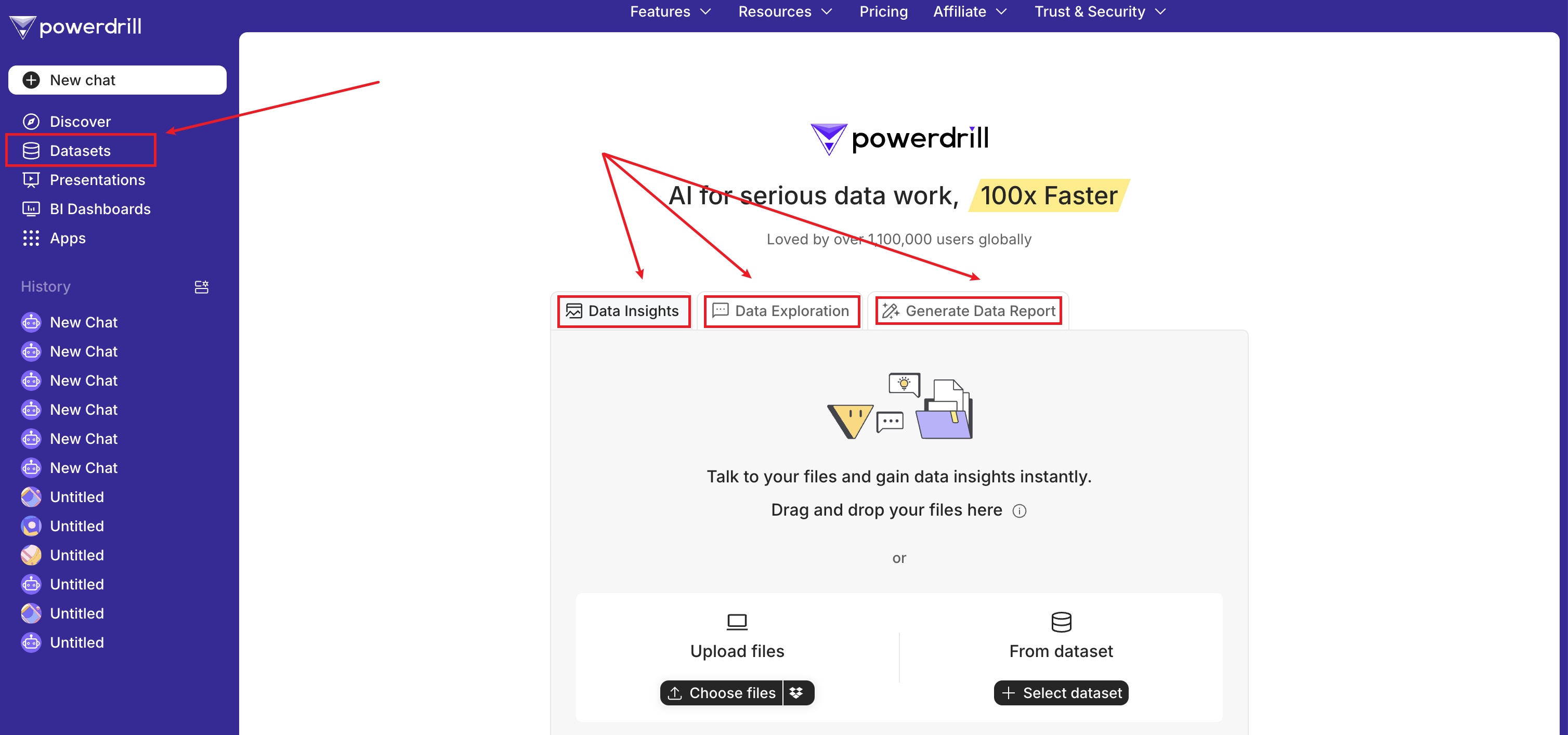 Uploaded files (excluding images and audio files) will be permanently stored in your datasets and will consume your storage quota. You can manage then on the **Datasets** page.
## Share your chat
Powerdrill allows you to share you chat history with others simply through a few clicks.
1. In your chat session, click the **Share** icon in the upper-right corner.
2. Select the records you want to share, or select **Select the latest 50 records** in the lower-left corner, and click **Continue**.
3. In the dialog box that is displayed, configure the shared link:
* To share by email, enter the emails in the **Share by email** field and click **Send to email**.
* To share as a link, click **Copy link**. Then you can paste the link to those who you want to share the chat with.
You can switch on the **Share my profile** option to let those who receive the chat history with your profile displayed.
To learn more about this feature, see [Chat Sharing](/features/chat-sharing).
## Explore more about Powerdrill?
Powerdrill provides several outstanding features. These features make Powerdrill distinct from other ordinary chat clients or services.
* [Multimedia Input/Output](/features/multimedia): understands images, generates images based on prompts, converts text to audio, and converts audio to text.
* [Smart DocMap](/features/smart-docmap): provides well-organized references, curated mind maps, and other info that help you understand your data.
* [Advanced Analytics](/features/advanced-analytics): analyzes your data to give full play to the value of your data.
* [Chat App over Dataset](/features/chat-app): provides smarter and more accurate answers to questions based on your datasets than ChatGPT.
* [No-code App Builder](/features/no-code-add-builder): enables you to build apps by simply writing prompts using natural language, with ZERO code required.
* [Dataset Sharing](/features/dataset-sharing): enables you to share your datasets in an easy, governed manner.
* [Chat Sharing](features/chat-sharing): allows you to create a shared link to your chat and share it with others.
* [Discover](features/discover): provides a hub for data, tech, science, and more.
* [AI Presentation Maker](features/ai-presentation): transforms your files into clear, organized presentations, reducing hours of work to minutes.
* [AI Report Generator](features/ai-data-reports): generates high-quality data report in one click.
***
## Need more help?
Get answers from our {community_0} members
Tell us more and we'll help you out
Uploaded files (excluding images and audio files) will be permanently stored in your datasets and will consume your storage quota. You can manage then on the **Datasets** page.
## Share your chat
Powerdrill allows you to share you chat history with others simply through a few clicks.
1. In your chat session, click the **Share** icon in the upper-right corner.
2. Select the records you want to share, or select **Select the latest 50 records** in the lower-left corner, and click **Continue**.
3. In the dialog box that is displayed, configure the shared link:
* To share by email, enter the emails in the **Share by email** field and click **Send to email**.
* To share as a link, click **Copy link**. Then you can paste the link to those who you want to share the chat with.
You can switch on the **Share my profile** option to let those who receive the chat history with your profile displayed.
To learn more about this feature, see [Chat Sharing](/features/chat-sharing).
## Explore more about Powerdrill?
Powerdrill provides several outstanding features. These features make Powerdrill distinct from other ordinary chat clients or services.
* [Multimedia Input/Output](/features/multimedia): understands images, generates images based on prompts, converts text to audio, and converts audio to text.
* [Smart DocMap](/features/smart-docmap): provides well-organized references, curated mind maps, and other info that help you understand your data.
* [Advanced Analytics](/features/advanced-analytics): analyzes your data to give full play to the value of your data.
* [Chat App over Dataset](/features/chat-app): provides smarter and more accurate answers to questions based on your datasets than ChatGPT.
* [No-code App Builder](/features/no-code-add-builder): enables you to build apps by simply writing prompts using natural language, with ZERO code required.
* [Dataset Sharing](/features/dataset-sharing): enables you to share your datasets in an easy, governed manner.
* [Chat Sharing](features/chat-sharing): allows you to create a shared link to your chat and share it with others.
* [Discover](features/discover): provides a hub for data, tech, science, and more.
* [AI Presentation Maker](features/ai-presentation): transforms your files into clear, organized presentations, reducing hours of work to minutes.
* [AI Report Generator](features/ai-data-reports): generates high-quality data report in one click.
***
## Need more help?
Get answers from our {community_0} members
Tell us more and we'll help you out