> ## Documentation Index
> Fetch the complete documentation index at: https://docs.powerdrill.ai/llms.txt
> Use this file to discover all available pages before exploring further.
# Discover
> A hub for data, tech, science, and more
export const community_0 = undefined
## Introduction
As a rapidly growing AI platform, we are dedicated to offering exceptional convenience and innovative solutions to our users. We are excited to announce the launch of the Discover feature, designed to help you explore and uncover a wealth of information and resources, enhancing your experience with our platform.
**Discover** is designed to provide you with the latest research papers and public datasets across a wide range of fields. Whether you're a student, researcher, data analyst, or simply curious, Discover aims to be your go-to resource for cutting-edge information and data from all walks of life.
## How to use Discover
1. Sign in to [Powerdrill](https://powerdrill.ai/).
2. In the left sidebar, choose **Discover**.
Next, select the domain you're interested in and begin your exploration!
## About papers
Powerdrill curates the latest high-quality papers from reputable sources such as [arXiv](https://aarxiv.org/). Each paper is presented with:
* **TLDR**: a concise summary that captures the essence of the entire paper.
* **Tables and images**: abstracted from the paper. They are vdisual representations of complex data, which enhance clarity and facilitate the efficient communication of key findings.
* **Paper digest**: answers to the most frequently asked questions about the paper, including the problem it addresses, the novel ideas, methods, or models it proposes, and more.
* **Outline or mindmap**: a structured overview of the paper, helping you easily navigate to the sections that interest you.
* **Insights**: provides potential questions and points of interest that you might want to explore further within the paper.
* **Text box**: allows you to interact directly with Powerdrill by asking any questions you have about the paper. Simply type your questions, and Powerdrill will promptly provide answers based on the content of the paper.
## About public datasets
Powerdrill also aggregates public datasets from trusted sources like [data.world](https://data.world/), ensuring you have access to reliable and high-quality data. Each dataset is presented with:
* **Description**: a brief overview of what the dataset contains and its key features.
* **Tables**: a display of the tables included in the dataset, providing a clear view of the structured data.
* **Basic info**: essential details about the dataset, including its source, creation date, size, and the original URL where it can be accessed.
* **Insights**: an area offering potential questions and points of interest you might want to explore within the dataset.
* **Text box**: engage with Powerdrill by asking any questions you have about the dataset. Simply type your questions, and Powerdrill will quickly provide answers based on the data.
* **Generate Data Fact**: Click this button to receive an insightful report summarizing key findings and trends discovered within the dataset.
## Sharing and collaboration
To share you interesting findings with your friends is very simple.
**For papers:**
To view or download a paper, click the **View PDF** button at the upper right corner. This will open the paper as a PDF file, and you can then choose to download it.
To share the paper digest, click the "Share" button next to **View PDF**. A dialog box will appear, allowing you to send it via email or copy the link to share with others.
Alternatively, you can click the "Download" button next to the "Share" button to download the paper digest as a PNG image.
**For datasets:**
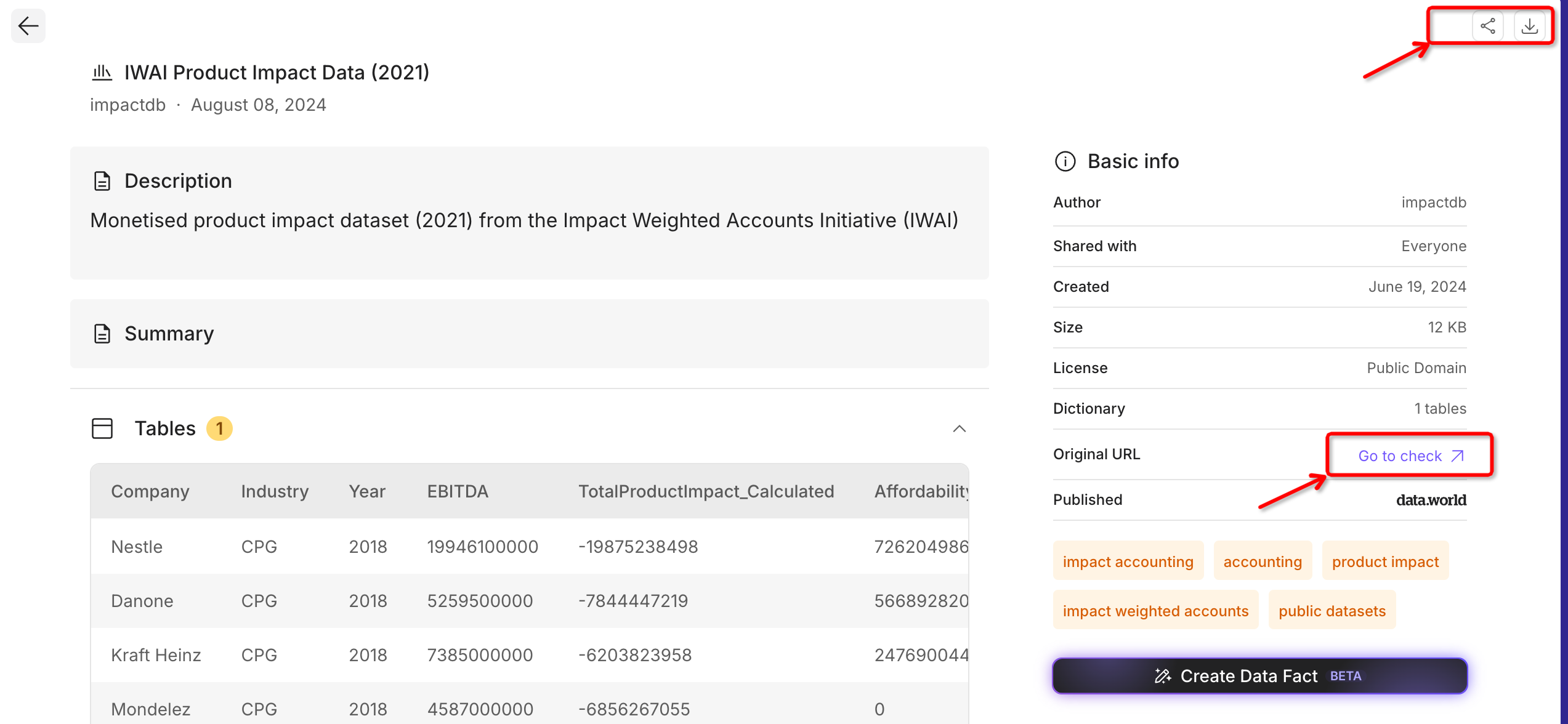
To view or download the source of a dataset, click the **Go to check** link provided in the **Basic info** area. This will navigate you to the dataset's source page.
To share the dataset summary, click the "Share" button located at the upper right corner. A dialog box will appear, giving you the option to send it via email or copy the link to share with others.
Alternatively, you can click the "Download" button next to the "Share" button to download the dataset summary as a PNG image.
## Related video tutorials
Kaggle dataset analysis:
Data.World dataset analysis:
***
## Need more help?
Get answers from our {community_0} members
Tell us more and we'll help you out
 To view or download a paper, click the **View PDF** button at the upper right corner. This will open the paper as a PDF file, and you can then choose to download it.
To share the paper digest, click the "Share" button next to **View PDF**. A dialog box will appear, allowing you to send it via email or copy the link to share with others.
To view or download a paper, click the **View PDF** button at the upper right corner. This will open the paper as a PDF file, and you can then choose to download it.
To share the paper digest, click the "Share" button next to **View PDF**. A dialog box will appear, allowing you to send it via email or copy the link to share with others.
 Alternatively, you can click the "Download" button next to the "Share" button to download the paper digest as a PNG image.
**For datasets:**
Alternatively, you can click the "Download" button next to the "Share" button to download the paper digest as a PNG image.
**For datasets:**
 To view or download the source of a dataset, click the **Go to check** link provided in the **Basic info** area. This will navigate you to the dataset's source page.
To share the dataset summary, click the "Share" button located at the upper right corner. A dialog box will appear, giving you the option to send it via email or copy the link to share with others.
To view or download the source of a dataset, click the **Go to check** link provided in the **Basic info** area. This will navigate you to the dataset's source page.
To share the dataset summary, click the "Share" button located at the upper right corner. A dialog box will appear, giving you the option to send it via email or copy the link to share with others.
 Alternatively, you can click the "Download" button next to the "Share" button to download the dataset summary as a PNG image.
## Related video tutorials
Kaggle dataset analysis:
Data.World dataset analysis:
***
## Need more help?
Alternatively, you can click the "Download" button next to the "Share" button to download the dataset summary as a PNG image.
## Related video tutorials
Kaggle dataset analysis:
Data.World dataset analysis:
***
## Need more help?