> ## Documentation Index
> Fetch the complete documentation index at: https://docs.powerdrill.ai/llms.txt
> Use this file to discover all available pages before exploring further.
# Chat App over Dataset
> Delivers smarter and more accurate answers to questions based on your datasets than ChatGPT
export const community_0 = undefined
## Introduction
ChatGPT has already shown exciting capabilities in understanding natural language and applying public internet knowledge. However, there is still room for improvement in its deep understanding of specific domains and private data. Fortunately, we can guide ChatGPT to better understand and answer questions using appropriate prompts. Furthermore, we can fine-tune OpenAI's LLMs for specific domains and private data to enhance its understanding of domain knowledge and private data.
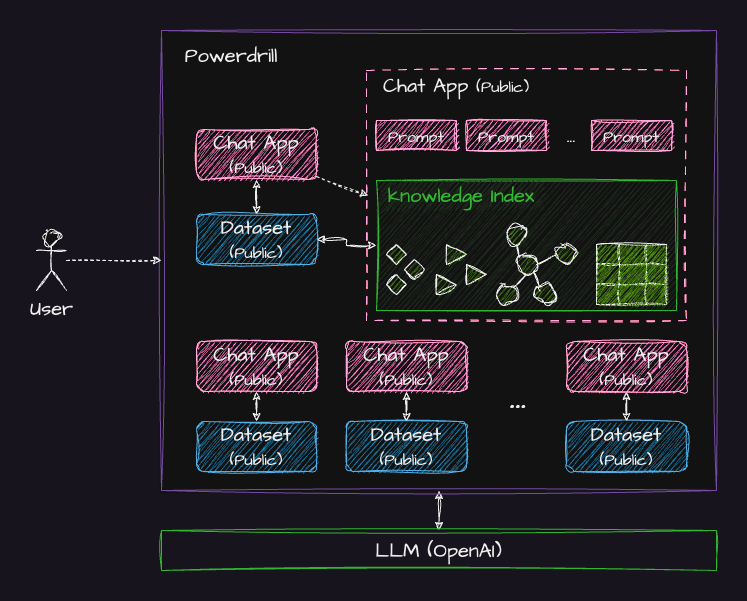
Building on this, Powerdrill has integrated several public Apps that have been tailored to specific datasets. These Apps have undergone **knowledge processing** and **knowledge indexing**, so they can answer questions about the specific domains and data more accurately than ChatGPT with general LLMs. This unique feature of Powerdrill provides a more precise and efficient solution for domain-specific inquiries, thereby bridging the gap between your data and AI.
With Powerdrill, you can leverage the power of AI to transform your data into a valuable knowledge base. This surpasses the accuracy of ChatGPT and provides a solution better tailored to your specific needs.
***
## How to use this feature
Simple Chat — a built-in chat App — is used as an example App in the following procedure to describe how to use Chat App over Dataset feature.
### Prerequisites
You have signed in to Powerdrill and created a dataset with Simple Chat associated.
For more information about how to log in to Powerdrill and create a dataset, see Steps 1 and 2 in [Try Out Powerdrill in Minutes](/quick-start#step-1-sign-in-to-powerdrill).
### Procedure
Method 1:
1. On the **Datasets** page, find the row where the target dataset resides, click **Simple Chat** in the **Associated Apps** column.
If **Multiple Apps** is displayed in the **Associated Apps** column, click the button next **Multiple Apps** and select Simple Chat from the Apps list.
2. In the new session, ask questions based on your dataset.
Method 2:
1. On the **Apps** page, click **Simple Chat**.
2. In the upper-right corner of the new session, select your dataset in the **Associate Dataset** drop-down list.
3. Ask questions based on your dataset.
***
## Watch a demo
***
## Need more help?
Get answers from our {community_0} members
Tell us more and we'll help you out
 ***
## How to use this feature
Simple Chat — a built-in chat App — is used as an example App in the following procedure to describe how to use Chat App over Dataset feature.
### Prerequisites
You have signed in to Powerdrill and created a dataset with Simple Chat associated.
For more information about how to log in to Powerdrill and create a dataset, see Steps 1 and 2 in [Try Out Powerdrill in Minutes](/quick-start#step-1-sign-in-to-powerdrill).
### Procedure
Method 1:
1. On the **Datasets** page, find the row where the target dataset resides, click **Simple Chat** in the **Associated Apps** column.
If **Multiple Apps** is displayed in the **Associated Apps** column, click the button next **Multiple Apps** and select Simple Chat from the Apps list.
2. In the new session, ask questions based on your dataset.
Method 2:
1. On the **Apps** page, click **Simple Chat**.
2. In the upper-right corner of the new session, select your dataset in the **Associate Dataset** drop-down list.
3. Ask questions based on your dataset.
***
## Watch a demo
***
## Need more help?
***
## How to use this feature
Simple Chat — a built-in chat App — is used as an example App in the following procedure to describe how to use Chat App over Dataset feature.
### Prerequisites
You have signed in to Powerdrill and created a dataset with Simple Chat associated.
For more information about how to log in to Powerdrill and create a dataset, see Steps 1 and 2 in [Try Out Powerdrill in Minutes](/quick-start#step-1-sign-in-to-powerdrill).
### Procedure
Method 1:
1. On the **Datasets** page, find the row where the target dataset resides, click **Simple Chat** in the **Associated Apps** column.
If **Multiple Apps** is displayed in the **Associated Apps** column, click the button next **Multiple Apps** and select Simple Chat from the Apps list.
2. In the new session, ask questions based on your dataset.
Method 2:
1. On the **Apps** page, click **Simple Chat**.
2. In the upper-right corner of the new session, select your dataset in the **Associate Dataset** drop-down list.
3. Ask questions based on your dataset.
***
## Watch a demo
***
## Need more help?