> ## Documentation Index
> Fetch the complete documentation index at: https://docs.powerdrill.ai/llms.txt
> Use this file to discover all available pages before exploring further.
# How Can I Delete My Account After I Have Created a Team on Powerdrill Enterprise?
> The admin account is closely tied to your organization. Do not delete it unless necessary
export const community_0 = undefined
Deleting the admin account is a critical action, as it is closely tied to your organization. To proceed, you must first delete your entire organization. We strongly advise against this operation unless it is absolutely necessary. Please carefully consider the impacts before taking this operation.
If you still wish to delete your admin account, follow the steps below.
***
## Step 1. Delete your organization
Deleting your organization is a serious action and cannot be undone. We strongly recommend carefully considering whether it's absolutely necessary before proceeding. Please make sure this is the right decision for your team and data.
Once you delete your organization, the following will be lost:
* All users will be removed from the team.
* All subscription records will be deleted.
* All projects and datasets within those projects will be removed.
* Credit card information will be deleted.
* Usage and billing data will be erased.
If you still wish to delete your organization, please follow these steps in the Admin console:
Don't know how to enter the Admin console? Refer to this [FAQ](/enterprise/enter-admin-console.mdx).
1. Cancel all subscriptions to job plans (if any):
Go to the **Subscriptions & plans** page, choose **Manage** > **Unsubscribe** in the **Actions** column for each subscription, and confirm the operation.
2. Cancel your subscription to the AI Workspace capacity plan (if any):
Go to the **Usage & billing** page, click **Unsubscribe** in the **Workspace capacity** section.
3. Delete your organization:
Go to the **Settings** page, click **Delete organization** in the **DANGER ZONE** section, and confirm the action.
***
## Step 2. Unsubcribe from your Powerdrill Personal Edition Plan
After deleting your organization, check if you are subscribed to any pricing plan under the Powerdrill Personal Edition. If so, make sure to unsubscribe before proceeding. If not, skip this step.
1. Click your profile icon on the upper-right corner of the page and click **Switch Workspace**.
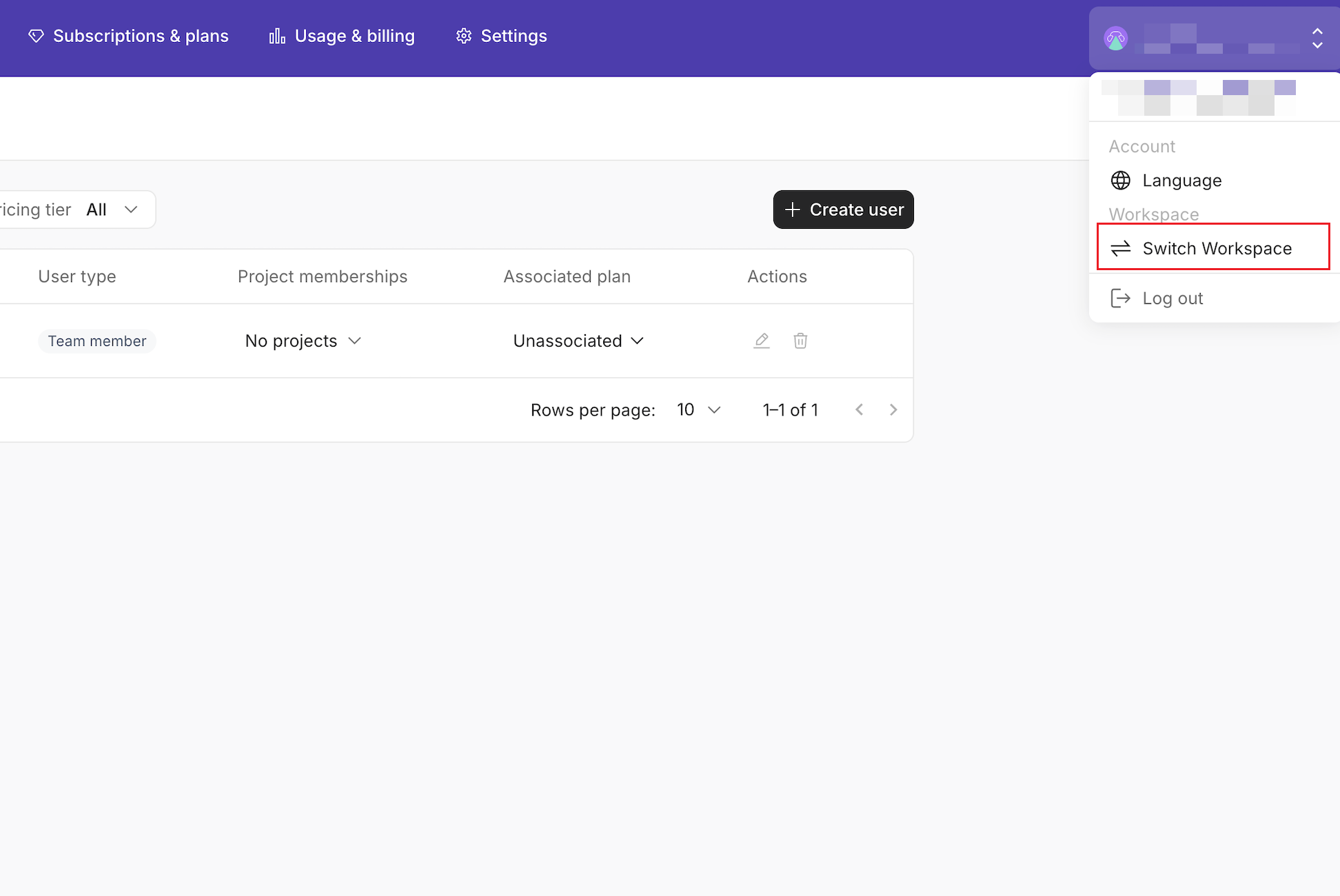 2. On the page that appears, click the **My personal space** card.
3. In your personal space that appears, click your profile icon on the lower-right corner.
2. On the page that appears, click the **My personal space** card.
3. In your personal space that appears, click your profile icon on the lower-right corner.
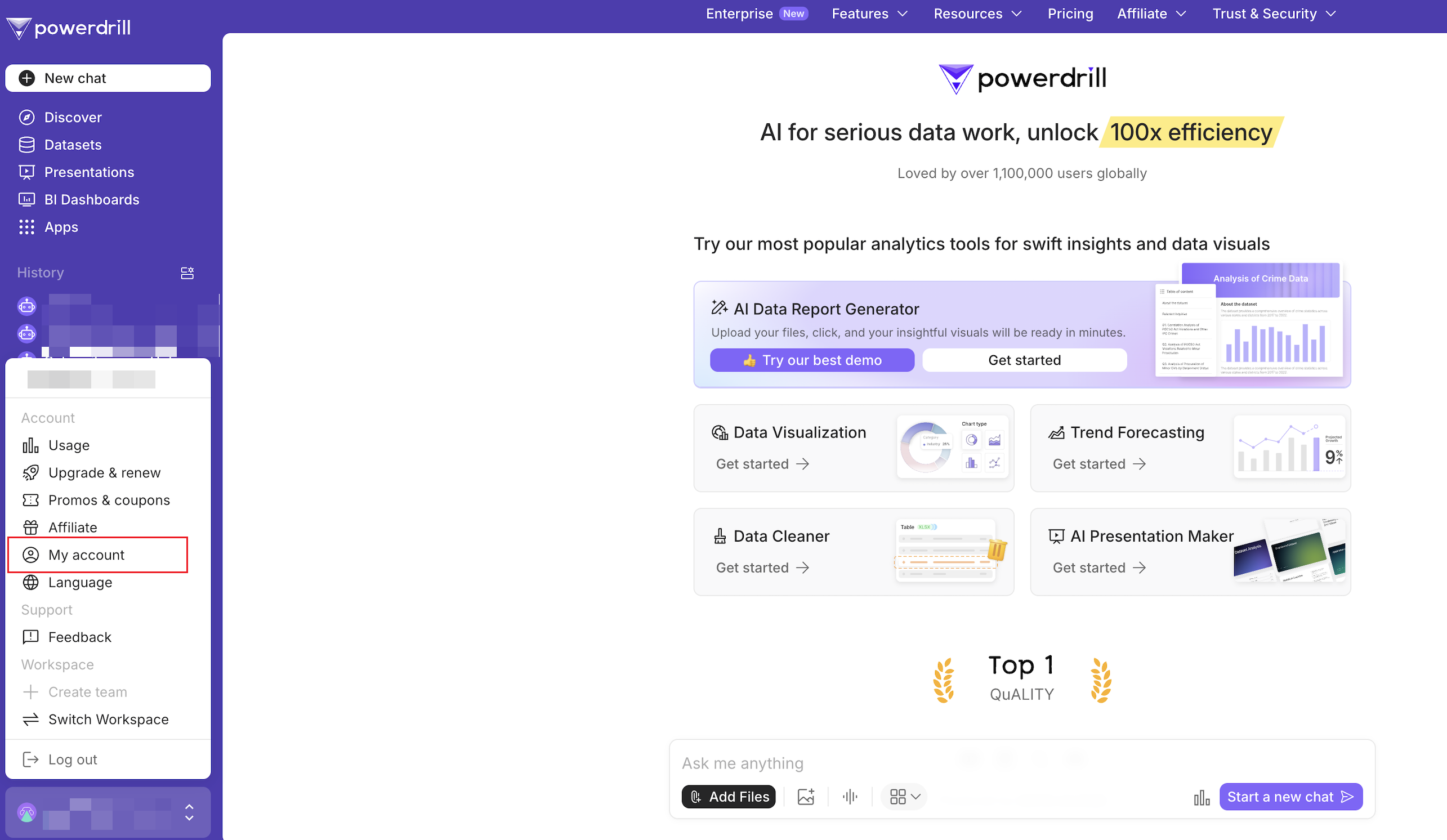 4. Click **Upgrade & renew**, choose **...** > **Unsubscribe** next to **My Invoices** button, and then confirm your unsubscription as prompted.
***
## Step 3. Delete your account
Once there is no organization or personal edition plan linked to your account, you may proceed to delete your organization.
We want to remind you once again that this action is not recommended. Please carefully consider the impacts before proceeding.
Once you delete your account, all data—including your datasets and job execution history—will be permanently erased and cannot be recovered.
1. Click **My account**.
2. In the **DANGER ZONE** section, click **Delete account**, and confirm the operation.
***
## Need more help?
Get answers from our {community_0} members
Tell us more and we'll help you out
4. Click **Upgrade & renew**, choose **...** > **Unsubscribe** next to **My Invoices** button, and then confirm your unsubscription as prompted.
***
## Step 3. Delete your account
Once there is no organization or personal edition plan linked to your account, you may proceed to delete your organization.
We want to remind you once again that this action is not recommended. Please carefully consider the impacts before proceeding.
Once you delete your account, all data—including your datasets and job execution history—will be permanently erased and cannot be recovered.
1. Click **My account**.
2. In the **DANGER ZONE** section, click **Delete account**, and confirm the operation.
***
## Need more help?
Get answers from our {community_0} members
Tell us more and we'll help you out